
Sell warranties on every Shopify product page.
Coverly adds extended warranty options to your Shopify product pages, styled to match your store. Customers pick a plan, it goes into the cart with the product, and you keep the revenue.
- Free plan available
- No per-order fees
- No theme code to edit

Plan suggestions
Plans that fit what you already sell
Coverly looks at your catalog and proposes protection plans with prices, terms and perks. Add one in a click, or tweak it first.
- Flat or percentage pricing chosen for the product type
- A primary term and three perks per plan
- Updated periodically as your catalog changes
Plan builder
Build the plan, option by option
Set durations, prices and perks for each option. Drag to reorder, mark one as most popular, and save.
- Fixed price or a percentage of the product price
- Durations in days, months or years
- Discounts, perks and a most popular badge per option
Product targeting
The right plan on the right products
Include or exclude products by collection, vendor or tag. Sports watches get one plan, dress watches another.
- Include by collection, vendor or tag
- Exclude products that should not be covered
- New products in a matching collection are covered automatically
Product page widget
Eight themes, and your CSS when none fit
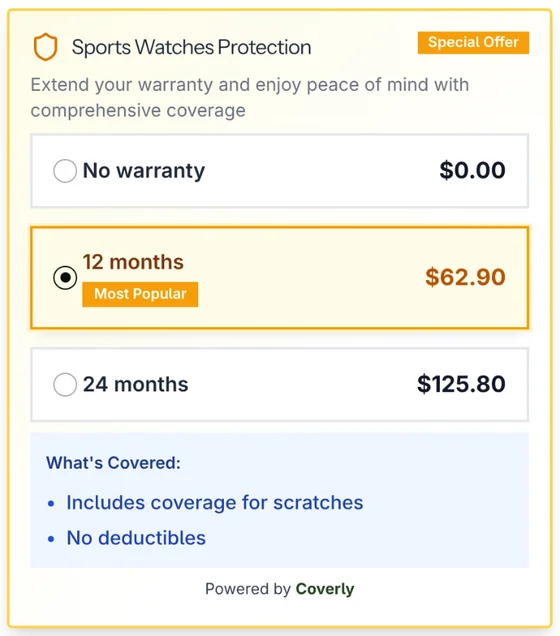
The widget sits above Add to cart and shows each option with its price. Pick a theme, round the corners, and choose which badges to show.
- Roundness, badges, perk list style and wording
- English, Spanish, French and Brazilian Portuguese
- Added in the theme editor as an app block, with no code
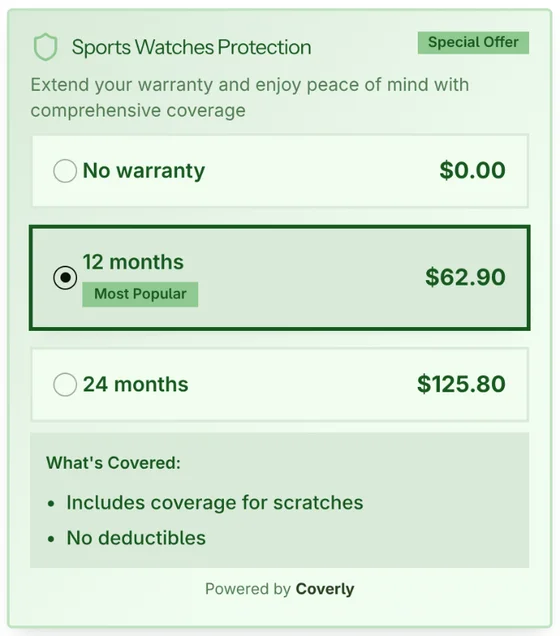
Every theme shown here is a real capture of the widget on the same product, switched between its 8 built-in themes.
Cart and revenue
One cart line, and the numbers that come with it
The product and its plan travel together through cart and checkout. The Coverly home page shows what coverage earns.
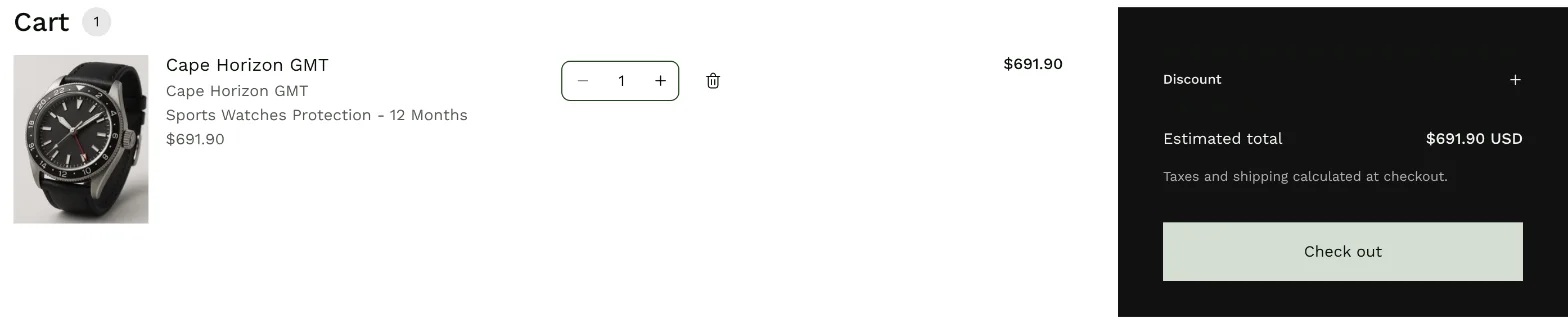
- Product and plan merged into one cart line
- Coverage revenue, plans sold and average order value
- Today, last 7 days, last 30 days or this month
Selling coverage in four steps
Install Coverly
Add the Shopify warranty app from the App Store. You can start on the free plan.
Create your first plan
Add a suggested plan in one click, or set durations, prices and perks yourself.
Add the block to your product page
Place the Coverly block in the theme editor and pick a theme. No code to paste.
Track what it earns
Coverage revenue, plans sold and average order value show on the Coverly home page.
Questions merchants ask
What is Coverly?
Coverly is a Shopify warranty app for selling your own extended warranties and product protection plans. You create plans with durations, prices and perks, Coverly shows them on your product pages, and the plan the customer picks is added to the cart with the product.
Who handles warranty claims?
You do. Coverly is not an insurer or a third-party warranty provider. You decide what each plan covers and honor it the way you would any store warranty, and you keep the full price of every plan you sell.
How much does Coverly cost?
Coverly has a free plan and a paid plan, with no per-order fees on either. Current plans and prices are on the Coverly listing in the Shopify App Store. See plans and pricing
How are plan prices calculated?
Each option has a fixed price or a percentage of the product price. Percentage options follow each product’s price, so a 10% plan costs $62.90 on a $629 watch. You can also set a discount on any option.
Can I choose which products get a plan?
Yes. Include or exclude products by collection, vendor or tag. Each plan only shows on the products that match its conditions.
Will the widget match my theme?
Pick one of eight built-in themes, then adjust corner roundness, badges, perk list style and wording in the theme editor. For anything else, add your own CSS.
What happens in the cart?
The product and its plan are merged into one cart line, so the customer sees a single item with the coverage they chose. The plan is a regular Shopify product, so it appears in your orders and reports.
Which languages does the widget support?
The product page widget ships in English, Spanish, French and Brazilian Portuguese.
Do I need to edit theme code?
No. Coverly is a theme app block. Add it to your product template in the theme editor, the same way you add any other section block.
Put a warranty next to Add to cart.
Install Coverly, add a suggested plan and switch on the product page block. No theme code, no per-order fees.
Install free on Shopify